
Simple Text Editor with Google Drive Access
Overview
The software is a lightweight, web-based text editor designed for handling plain text files, code, and configuration files. It enables users to open any file stored on Google Drive directly within their web browser, either through the Google Drive interface or via a built-in file explorer. The tool is not intended for editing binary files or documents with proprietary formats such as PDFs or DOC files.
Its primary purpose is to serve as a straightforward utility for developers, system administrators, and users who need quick access to text-based content stored in the cloud. The application supports a wide range of syntaxes, making it suitable for writing and reviewing code, scripts, and configuration files. It is particularly useful for users who prefer to work within a browser environment without installing additional desktop software.
The developer did not provide additional information about the company or background. Real-world usage scenarios include editing configuration files on the fly, reviewing log files, or writing code snippets directly from a Google Drive folder.
Key Features & Capabilities
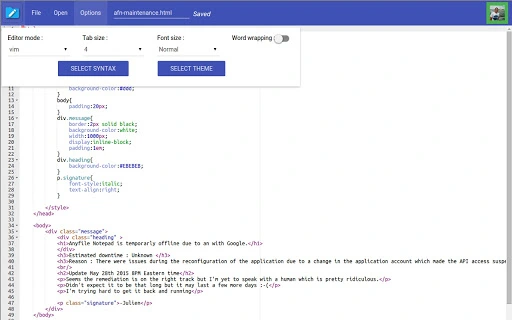
- 100+ Syntax Support – Recognizes and highlights syntax for a broad range of programming languages and markup formats, improving readability and reducing errors during code editing.
- Emacs and Vim Modes – Offers keyboard navigation and command shortcuts familiar to users of these classic text editors, enhancing efficiency for experienced developers.
- 32 Custom Themes – Provides visual customization options to suit different preferences and reduce eye strain during extended editing sessions.
- Built-in File Explorer – Allows direct browsing and opening of files from Google Drive without leaving the application, streamlining workflow for cloud-based projects.
- Direct File Creation on Google Drive – Users can create new text files directly within their Google Drive account through the app, simplifying file management.
- Google Drive Revisions Support – Retains access to version history of files stored in Google Drive, enabling users to restore previous versions when needed.
These features are especially beneficial for users who rely on Google Drive as their primary file storage. For example, a developer can open a configuration file from a project folder, edit it using Vim mode, and save it directly to the cloud with revision tracking. A system administrator might use the tool to review server logs stored in Drive, leveraging syntax highlighting to identify critical entries quickly. The integration with Google Drive ensures seamless access across devices, provided the user has an active internet connection.
User Interface, Workflow & Performance
The user interface is clean and minimal, designed for efficiency rather than visual complexity. Navigation is straightforward, with a file explorer panel on the left and the editing area on the right. The layout supports easy switching between files and quick access to settings.
The workflow is optimized for speed: users can open a file with a single click, apply syntax highlighting instantly, and save changes directly to Google Drive. The application runs entirely in the browser, which means it does not require installation or local storage beyond the browser cache. Performance is expected to be responsive under normal conditions, though actual behavior may vary based on internet speed and browser performance.
The developer did not specify resource usage details. Stability appears consistent with typical web applications, and no known issues were reported. Users should expect minimal lag when working with small to medium-sized text files.
For large files, performance may depend on the browser’s handling of memory and processing.
Compatibility & System Requirements
The software is compatible with Windows, Mac, and Linux operating systems, allowing broad accessibility across desktop environments. It functions as a web-based application, meaning it does not require native installation and can be accessed through any modern browser. The installation size is 10 MB, which refers to the application’s footprint in the browser cache or local storage if cached.
Exact system requirements were not listed. The application relies on Google Drive integration, so a valid Google account and an active internet connection are necessary to use all features. Platform compatibility information is limited to the supported operating systems mentioned.
No additional hardware specifications were provided. Users should ensure their browser is up to date to maintain optimal functionality.
Pros and Cons
Pros
- Direct access to Google Drive files via web browser
- Supports over 100 programming syntaxes with highlighting
- Offers Emacs and Vim keyboard modes for power users
- 32 customizable themes for visual comfort
- Ability to create new files directly in Google Drive
- Retains version history through Google Drive revisions
Cons
- Not suitable for editing binary or proprietary file formats
- Requires a stable internet connection for full functionality
- Dependent on Google Drive and browser performance
- No offline editing capability
- Resource usage details not specified by developer
FAQ Section
Is this software free to use?
Yes, the software is available at no cost. There are no subscription fees or hidden charges.
Can I use this editor offline?
No, the application requires an active internet connection to access Google Drive and function properly. It does not support offline editing.
What file types can I edit with this tool?
The tool is designed for plain text files, code, and configuration files. It cannot edit binary files or documents with proprietary encodings such as PDF, DOC, or XLS.
Does it support Google Drive version history?
Yes, the software supports Google Drive revisions, allowing users to view and restore previous versions of files stored in the cloud.
Is the software secure when accessing Google Drive?
The application uses standard Google Drive authentication and permissions. It does not store user data locally. Security is managed through Google’s infrastructure and user account controls.
Final Thoughts
This lightweight, browser-based text editor offers a streamlined solution for users who frequently work with text files stored in Google Drive. Its integration with cloud storage, extensive syntax support, and keyboard mode options make it a practical tool for developers and technical users. While it lacks offline functionality and is limited to text-based content, its strengths lie in simplicity, accessibility, and seamless cloud synchronization.
The lack of system requirements and minimal installation footprint enhance its usability across platforms. For anyone needing a fast, no-install text editor that works directly with Google Drive, this tool delivers a reliable and efficient experience. Download Simple Text Editor with Google Drive Access now.







